How to root samsung galaxy s4 quickly ( Cara rooting samsung galaxy s4 dengan cepat )
Before we do root android it's good if we know more clearly what is root android. More short root android is one way to free android phone from all the rules that we can not pass right, So we do not wonder if many features that they can not do for hp android that has not been in the root of one custom rom. That's why many hp android users who want their android phone in the root. For more details about root hp android you can read our previous article on What is Root Android
After my friend already know what is root android and its function then my friend is ready to do root hp android pal. One of the disadvantages when hp android in the root is the warranty will be lost. Does my friend intend to do root hp android pal?

Application Proven Work Root Samsung Galaxy S4 Without PC
How to Root Android
To do root android there are 2 ways that Root With PC & Jump On HP Android Such (Without PC)
#With PC: The android rooting process done with the help of pc, our android requirements must be connected to the computer via usb cable.
# Direct in Hp Android: The process of rooting android directly using hp android alias without pc, the requirement we must have android root application that supports android us. What we need to know is every hp android different rootnya application. So we have to find first the root application that supports android us.
In view of the two ways root above maybe we prefer to do the root the second way that is directly on the android phone (No PC) because it is more simple and easy. As we mentioned earlier on each different android type - different root applications.
As in the post this time we will give Application Proven Work Android Samsung Galaxy S4 Without PC. Here are some root applications that work for root Samsung Galaxy S4.
Root Genius ApplicationRead Also: How To Root Android Without PC With Root Genius Application
Framaroot ApplicationsRead Also: How To Root Android Without PC With Framaroot Applications
King Root Applications Also Read: How To Root Android Without a PC With King Root Applications
360Root ApplicationsRead Also: How To Root Android Without PC With 360Root Applications
Baiduroot ApplicationRead Also: How To Root Android Without PC With Baiduroot Application
Those are some proven apps work for root Samsung Galaxy S4 without pc. For my friend who is also interested in rooting the Samsung Galaxy S4 with the help of pc. Here we provide how to root Samsung Galaxy S4 via pc.
1. Before you can do root with pc make sure first buddy already download CF Auto Root android Samsung Galaxy S4 HERE. There are many root files that are provided there. Because only written model only, So my friend can download according to Samsung Galaxy S4 android model. For example for model SM-A520L namely android Samsung Galaxy A5
2. After successfully download according Samsung Galaxy S4 model then extract the zip file
3. Open the extracted folder and Run the Odin.exe program
4. At the beginning of the program Odin check on Auto Reboot and F. Reset Time, Then Click on AP / PDA then search and enter the file .tar.md5 downloaded earlier
Framaroot ApplicationsRead Also: How To Root Android Without PC With Framaroot Applications
King Root Applications Also Read: How To Root Android Without a PC With King Root Applications
360Root ApplicationsRead Also: How To Root Android Without PC With 360Root Applications
Baiduroot ApplicationRead Also: How To Root Android Without PC With Baiduroot Application
Those are some proven apps work for root Samsung Galaxy S4 without pc. For my friend who is also interested in rooting the Samsung Galaxy S4 with the help of pc. Here we provide how to root Samsung Galaxy S4 via pc.
1. Before you can do root with pc make sure first buddy already download CF Auto Root android Samsung Galaxy S4 HERE. There are many root files that are provided there. Because only written model only, So my friend can download according to Samsung Galaxy S4 android model. For example for model SM-A520L namely android Samsung Galaxy A5
2. After successfully download according Samsung Galaxy S4 model then extract the zip file
3. Open the extracted folder and Run the Odin.exe program
4. At the beginning of the program Odin check on Auto Reboot and F. Reset Time, Then Click on AP / PDA then search and enter the file .tar.md5 downloaded earlier

5. Next step setting and Enable USB Debuging on your android. Make sure also hp android buddy can already install apk applications or files outside the play store, if not please read first Overcoming HP Android Who Can not Install Applications From Outside
6. Then turn off your android phone and try to enter the Download Mode, how to press and hold down Volume down + Home + Power simultaneously until the samsung logo appears and then release. Then press the Volume up button to enter the Download Mode view
7. Connect your android phone to PC with USB cable. Make sure also when hp in connect the driver is installed automatically, If not then install the first usb driver samsung HERE
8. View the Odin program display in the ID: COM, if it is blue and the writing is added! at the bottom, then just click Start
6. Then turn off your android phone and try to enter the Download Mode, how to press and hold down Volume down + Home + Power simultaneously until the samsung logo appears and then release. Then press the Volume up button to enter the Download Mode view
7. Connect your android phone to PC with USB cable. Make sure also when hp in connect the driver is installed automatically, If not then install the first usb driver samsung HERE
8. View the Odin program display in the ID: COM, if it is blue and the writing is added! at the bottom, then just click Start

9. The root process is complete when your android phone is restarted on its own and it appears PASS! green in the Odin program

10. Now you can unplug the usb cable and look at the application menu if there is a new application called SuperSU. If there is soon open the application and if the application ask Update Binary then just select Continue
11. The final step please check the root condition using root checker application
11. The final step please check the root condition using root checker application








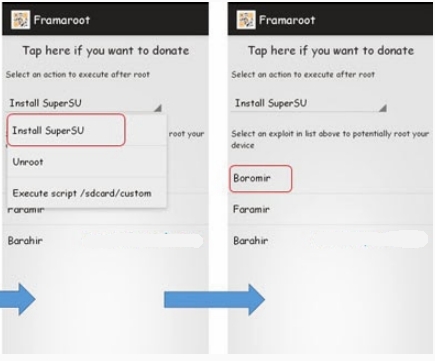
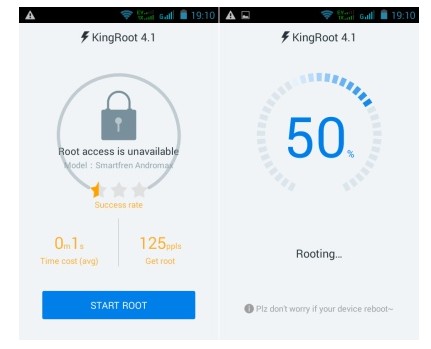




 Foto: Instagram Bumiaw
 Foto: Instagram Bumiaw
 Foto: Instagram Alvasus